> ## Documentation Index
> Fetch the complete documentation index at: https://docs.runmaestro.ai/llms.txt
> Use this file to discover all available pages before exploring further.
# Multiple Claude Accounts
> Run multiple Claude Code Max subscriptions simultaneously in Maestro.
Use two or more Claude Code Max subscriptions (e.g., personal and work accounts) with Maestro by pointing each agent at a separate Claude configuration directory. This lets you spread work across multiple accounts' quotas while keeping shared settings, sessions, and plugins.
## How It Works
Claude Code stores its configuration and auth credentials in `~/.claude` by default. The `CLAUDE_CONFIG_DIR` environment variable overrides this location. By creating a separate config directory per account - each with its own OAuth credentials - and symlinking shared resources back to a canonical source, you get:
* **Separate billing/authentication** per account
* **Shared sessions** - resume any session from either account
* **Shared settings, plugins, commands, plans, and skills** - configure once, use everywhere
## One-Time Setup
This setup is done once on your machine, outside of Maestro.
### 1. Authenticate Each Account
Start Claude Code normally and complete OAuth for your first account:
```bash theme={"theme":"dracula"}
claude
# Complete OAuth for account A (e.g., personal)
```
Copy the authenticated config to a named directory:
```bash theme={"theme":"dracula"}
cp -a ~/.claude ~/.claude-personal
```
Then authenticate your second account:
```bash theme={"theme":"dracula"}
mv ~/.claude/.claude.json ~/.claude/.claude.json.bak
claude
# Complete OAuth for account B (e.g., work)
cp -a ~/.claude ~/.claude-work
rm ~/.claude/.claude.json.bak
```
The main `~/.claude/` directory doesn't need its own `.claude.json`. It serves as the canonical source for shared resources.
### 2. Symlink Shared Resources
For each account directory, replace local copies with symlinks back to `~/.claude` so settings, plugins, and sessions stay in sync:
```bash theme={"theme":"dracula"}
# Repeat for each account directory (e.g., ~/.claude-personal, ~/.claude-work)
CONFIG_DIR=~/.claude-personal
# Back up directories that will be symlinked
mv $CONFIG_DIR/projects $CONFIG_DIR/projects-pre
mv $CONFIG_DIR/todos $CONFIG_DIR/todos-pre
mv $CONFIG_DIR/session-env $CONFIG_DIR/session-env-pre
# Remove files/dirs that will become symlinks
rm -rf $CONFIG_DIR/commands $CONFIG_DIR/ide $CONFIG_DIR/plans $CONFIG_DIR/plugins $CONFIG_DIR/skills
rm -f $CONFIG_DIR/settings.json $CONFIG_DIR/CLAUDE.md
# Create symlinks
ln -s ~/.claude/commands $CONFIG_DIR/commands
ln -s ~/.claude/ide $CONFIG_DIR/ide
ln -s ~/.claude/plans $CONFIG_DIR/plans
ln -s ~/.claude/plugins $CONFIG_DIR/plugins
ln -s ~/.claude/skills $CONFIG_DIR/skills
ln -s ~/.claude/settings.json $CONFIG_DIR/settings.json
ln -s ~/.claude/CLAUDE.md $CONFIG_DIR/CLAUDE.md
ln -s ~/.claude/todos $CONFIG_DIR/todos
ln -s ~/.claude/session-env $CONFIG_DIR/session-env
ln -s ../.claude/projects $CONFIG_DIR/projects
```
### What's Shared vs. Account-Specific
| Resource | Shared? | Notes |
| ------------------------------------------------------------- | ----------- | ----------------------------------------- |
| `projects/` (sessions) | Shared | Enables cross-account session resume |
| `settings.json`, `plugins/`, `commands/`, `plans/`, `skills/` | Shared | Configure once, use everywhere |
| `CLAUDE.md` | Shared | Global instructions apply to all accounts |
| `.claude.json` | Per-account | OAuth tokens and account identity |
| `history.jsonl` | Per-account | Recent session list differs per account |
## Configuring Agents in Maestro
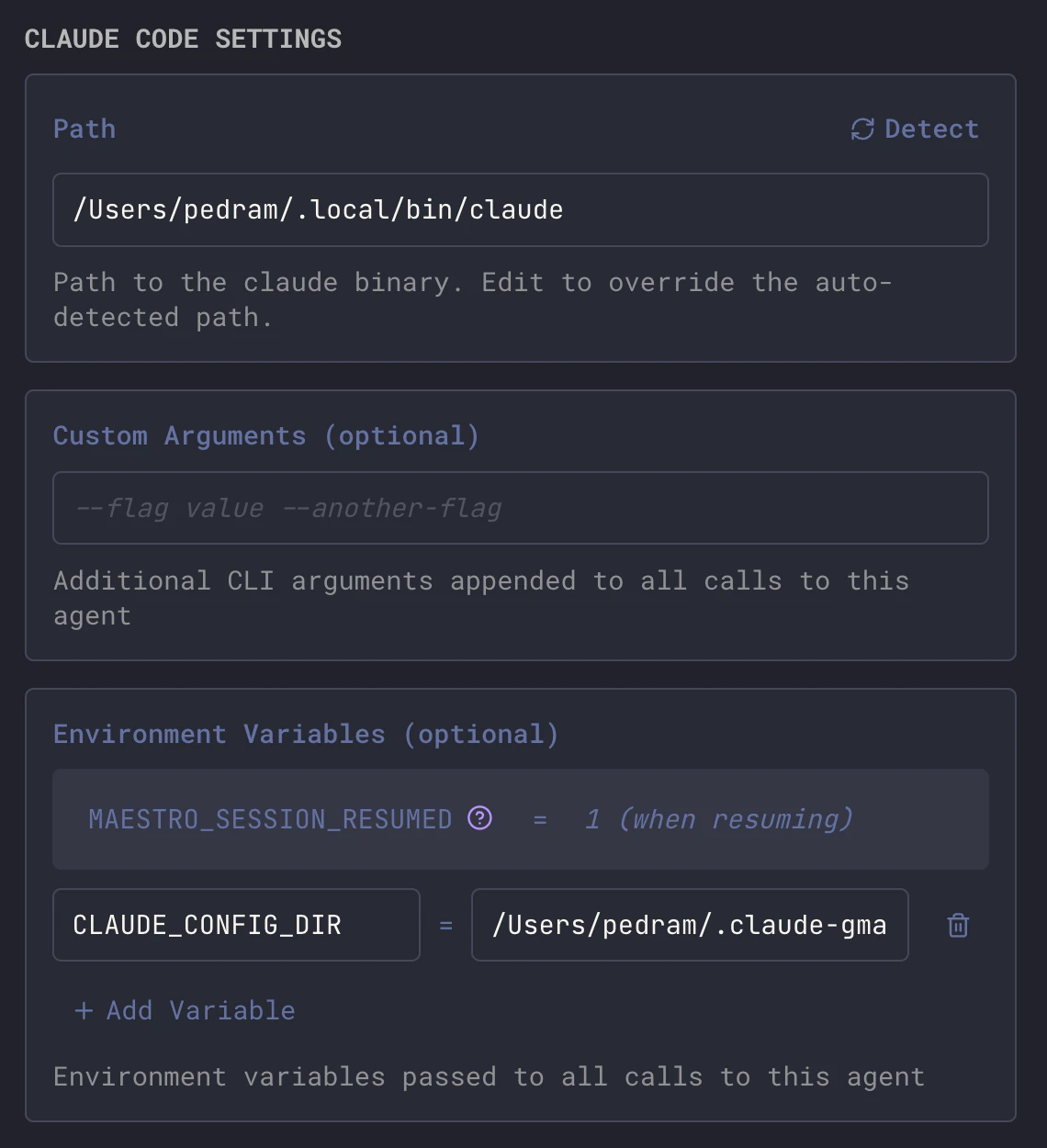
Once your config directories exist, point each Maestro agent at the right one using the `CLAUDE_CONFIG_DIR` environment variable.
### When Creating a New Agent
1. Click **+** in the sidebar to create a new agent
2. Select **Claude Code** as the provider
3. Expand the **Environment Variables** section
4. Click **+ Add Variable**
5. Set `CLAUDE_CONFIG_DIR` to your account's config path (e.g., `/Users/you/.claude-personal`)
### When Editing an Existing Agent
1. Right-click an agent in the sidebar → **Edit Agent**, or use `Cmd+E` / `Ctrl+E`
2. Scroll to the **Environment Variables** section
3. Add `CLAUDE_CONFIG_DIR` with the path to the desired account's config directory
 ### Recommended Setup
Create one agent per account and name them clearly:
| Agent Name | `CLAUDE_CONFIG_DIR` |
| ----------------- | ----------------------------- |
| Claude (Personal) | `/Users/you/.claude-personal` |
| Claude (Work) | `/Users/you/.claude-work` |
This way you can see at a glance which account's quota you're using. When one account hits its limit, switch to the other.
## Tips
* **Session resume works cross-account** - because `projects/` is symlinked, you can start a session on one account and resume it on another.
* **Don't run both on the same project simultaneously** - two Claude instances writing to the same session files can cause contention. Use one at a time per project.
* **Symlinks may break after Claude Code updates** - if an update recreates a directory, re-run the symlink commands from step 2.
### Recommended Setup
Create one agent per account and name them clearly:
| Agent Name | `CLAUDE_CONFIG_DIR` |
| ----------------- | ----------------------------- |
| Claude (Personal) | `/Users/you/.claude-personal` |
| Claude (Work) | `/Users/you/.claude-work` |
This way you can see at a glance which account's quota you're using. When one account hits its limit, switch to the other.
## Tips
* **Session resume works cross-account** - because `projects/` is symlinked, you can start a session on one account and resume it on another.
* **Don't run both on the same project simultaneously** - two Claude instances writing to the same session files can cause contention. Use one at a time per project.
* **Symlinks may break after Claude Code updates** - if an update recreates a directory, re-run the symlink commands from step 2.