> ## Documentation Index
> Fetch the complete documentation index at: https://docs.runmaestro.ai/llms.txt
> Use this file to discover all available pages before exploring further.
# Multiple Accounts
> Run several accounts of the same provider side by side in Maestro, and spread work across their quotas.
One agent runs as one account. Point two agents at two different logins for the
same provider and they draw on two separate quotas, so the one that runs dry
does not stop the other.
The account is selected by an environment variable on the agent, which is why
this is a per-agent setting rather than a global one. Every provider spells that
variable differently, and a few have no way to express it at all.
## What Works Today
| Provider | Account selector | Maestro attributes it | Sessions cross accounts |
| ---------------- | ---------------------------- | --------------------- | ----------------------- |
| **Claude Code** | `CLAUDE_CONFIG_DIR` | Yes | Yes, with symlinks |
| **Codex** | `CODEX_HOME` | Yes | No |
| **OpenCode** | `XDG_DATA_HOME` | No | No |
| **Copilot CLI** | None - one login per machine | Split by home | No |
| **Local models** | n/a - no account to switch | n/a | n/a |
"Maestro attributes it" means the [Usage Dashboard](/usage-dashboard) account
filter, the per-card account badge, and the Context Window tooltip name the
account. For providers outside that column, Maestro sees one profile no matter
how many logins you juggle.
Copilot CLI is the odd one out. It has no account selector - the login is
machine-wide - but `COPILOT_HOME` does move the transcripts, so Maestro reads
every home it finds and files each as its own profile. Those profiles are
separate transcript trees, not separate logins: they all bill the same GitHub
account, and the split is a workspace split rather than a quota split.
Stay on **one provider, different accounts**. Mixing providers on the same work
is a roadmap item, not a supported workflow - see [Switching Providers](#switching-providers)
at the bottom of this page.
## Setting the Variable in Maestro
The steps are the same whichever variable your provider uses. Only the variable
name and its value change.
### When Creating a New Agent
1. Click **+** in the sidebar to create a new agent
2. Select the provider
3. Expand the **Environment Variables** section
4. Click **+ Add Variable**
5. Set the provider's account variable to that account's path
### When Editing an Existing Agent
1. Right-click an agent in the sidebar → **Edit Agent**, or use `Alt+Cmd+,` / `Alt+Ctrl+,`
2. Scroll to the **Environment Variables (optional)** section
3. Add the variable
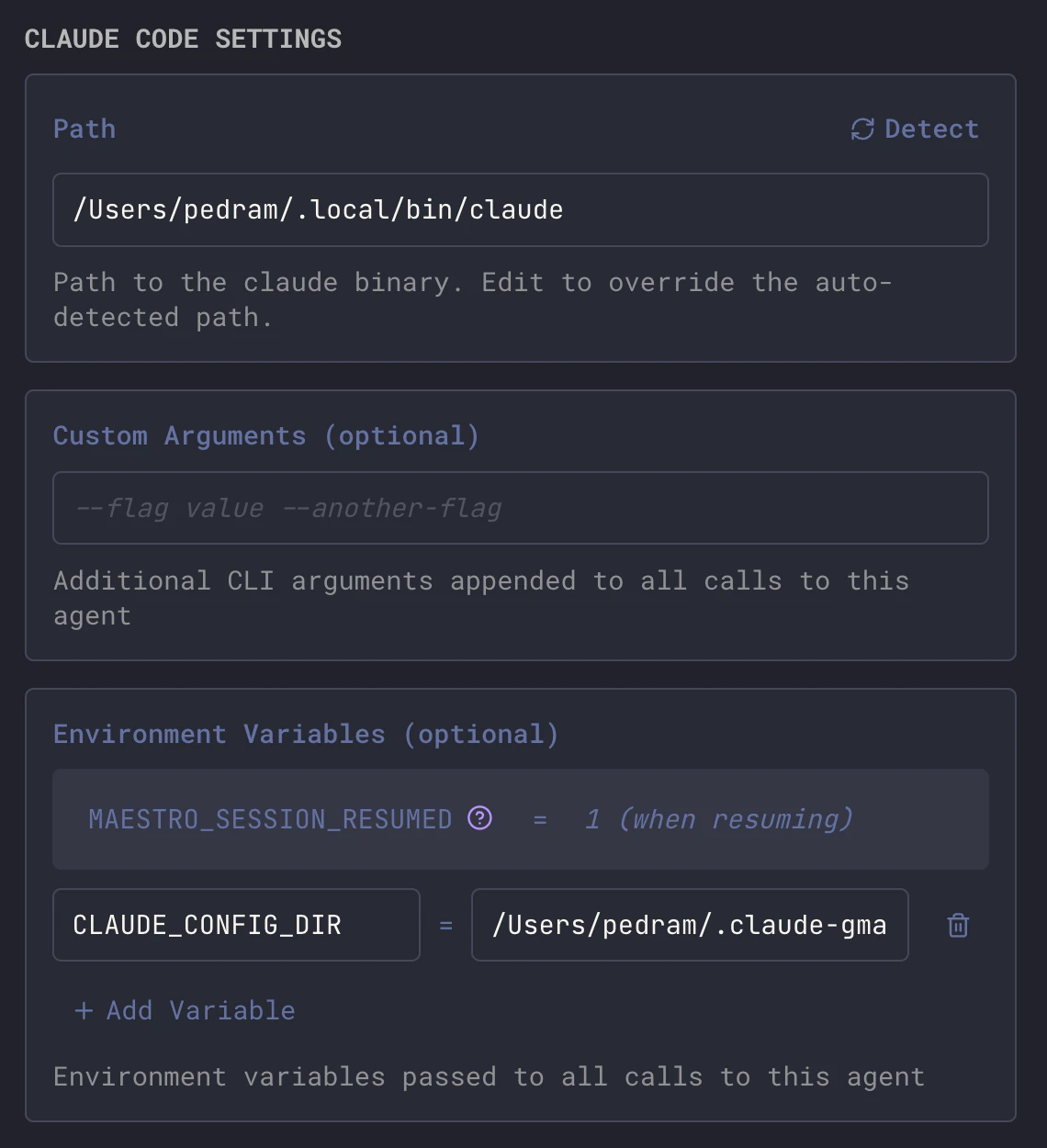 Or from the CLI, without opening the app:
```bash theme={"theme":"dracula"}
maestro-cli update-agent --env CLAUDE_CONFIG_DIR=/Users/you/.claude-work
```
Per-agent variables **replace** the provider-level set rather than layering over
it. An agent that carries any variable of its own loses every provider-level
default, including keys it never set. If an agent needs both an account
directory and an API key, set both on the agent. See
[Environment Variable Precedence](/configuration#environment-variable-precedence).
### Confirming Which Account a Tab Runs As
Agent names are a convention, not a guarantee - a renamed agent, or a variable
edited after the fact, leaves the two out of step. To read the account off the
tab itself, hover the **Context Window** gauge in the Main Window header:
| Row | Shows |
| ------------ | ---------------------------------------------------------------------------------------------------------------------- |
| **Provider** | The agent's provider, for example `Claude Code` |
| **Profile** | The account, derived from the config dir: `.claude-work` shows as `work`, a plain `~/.claude` as `Claude Code default` |
The profile resolves the same way the [Usage Dashboard](/usage-dashboard)
attributes an agent, so the account named here and the quota bars beneath it are
the same account. Hover the profile name for the full path. Providers with no
per-account config directory show only the **Provider** row.
***
## Claude Code
Claude Code reads its configuration and OAuth credentials from `~/.claude`.
`CLAUDE_CONFIG_DIR` moves that directory. Because Claude stores sessions as
plain JSONL files, you can give each account its own credentials while
symlinking the shared parts back to one canonical source - which means sessions
resume across accounts.
### 1. Authenticate Each Account
Start Claude Code normally and complete OAuth for your first account:
```bash theme={"theme":"dracula"}
claude
# Complete OAuth for account A (e.g., personal)
```
Copy the authenticated config to a named directory:
```bash theme={"theme":"dracula"}
cp -a ~/.claude ~/.claude-personal
```
Then authenticate your second account:
```bash theme={"theme":"dracula"}
mv ~/.claude/.claude.json ~/.claude/.claude.json.bak
claude
# Complete OAuth for account B (e.g., work)
cp -a ~/.claude ~/.claude-work
rm ~/.claude/.claude.json.bak
```
The main `~/.claude/` directory does not need its own `.claude.json`. It serves
as the canonical source for shared resources.
### 2. Symlink Shared Resources
For each account directory, replace local copies with symlinks back to
`~/.claude` so settings, plugins, and sessions stay in sync:
```bash theme={"theme":"dracula"}
# Repeat for each account directory (e.g., ~/.claude-personal, ~/.claude-work)
CONFIG_DIR=~/.claude-personal
# Back up directories that will be symlinked
mv $CONFIG_DIR/projects $CONFIG_DIR/projects-pre
mv $CONFIG_DIR/todos $CONFIG_DIR/todos-pre
mv $CONFIG_DIR/session-env $CONFIG_DIR/session-env-pre
# Remove files/dirs that will become symlinks
rm -rf $CONFIG_DIR/commands $CONFIG_DIR/ide $CONFIG_DIR/plans $CONFIG_DIR/plugins $CONFIG_DIR/skills
rm -f $CONFIG_DIR/settings.json $CONFIG_DIR/CLAUDE.md
# Create symlinks
ln -s ~/.claude/commands $CONFIG_DIR/commands
ln -s ~/.claude/ide $CONFIG_DIR/ide
ln -s ~/.claude/plans $CONFIG_DIR/plans
ln -s ~/.claude/plugins $CONFIG_DIR/plugins
ln -s ~/.claude/skills $CONFIG_DIR/skills
ln -s ~/.claude/settings.json $CONFIG_DIR/settings.json
ln -s ~/.claude/CLAUDE.md $CONFIG_DIR/CLAUDE.md
ln -s ~/.claude/todos $CONFIG_DIR/todos
ln -s ~/.claude/session-env $CONFIG_DIR/session-env
ln -s ../.claude/projects $CONFIG_DIR/projects
```
### What Is Shared vs. Account-Specific
| Resource | Shared? | Notes |
| ------------------------------------------------------------- | ----------- | ----------------------------------------- |
| `projects/` (sessions) | Shared | Enables cross-account session resume |
| `settings.json`, `plugins/`, `commands/`, `plans/`, `skills/` | Shared | Configure once, use everywhere |
| `CLAUDE.md` | Shared | Global instructions apply to all accounts |
| `.claude.json` | Per-account | OAuth tokens and account identity |
| `history.jsonl` | Per-account | Recent session list differs per account |
### Recommended Setup
One agent per account, named so you can read the split at a glance:
| Agent Name | `CLAUDE_CONFIG_DIR` |
| ----------------- | ----------------------------- |
| Claude (Personal) | `/Users/you/.claude-personal` |
| Claude (Work) | `/Users/you/.claude-work` |
### Notes
* **Session resume works cross-account** because `projects/` is symlinked.
* **Do not run both on the same project at once.** Two Claude instances writing
the same session files contend with each other. One at a time per project.
* **Symlinks may break after a Claude Code update.** If an update recreates a
directory, re-run the symlink commands.
* Maestro samples each account's remaining quota separately, so the Usage
Dashboard's quota panels show one set of bars per account.
***
## Codex
Codex reads its configuration, `auth.json`, and session state from `~/.codex`.
`CODEX_HOME` moves the whole directory.
```bash theme={"theme":"dracula"}
# Authenticate the second account into its own home
CODEX_HOME=~/.codex-work codex login
```
Then set `CODEX_HOME=/Users/you/.codex-work` on the agent.
### What Does Not Carry Over
Codex keeps sessions, memories, and queue state in SQLite databases
(`thread_history_*.sqlite`, `memories_*.sqlite`, `state_*.sqlite`), each with a
write-ahead log. **Do not symlink those between accounts** - two Codex processes
sharing one database file will corrupt it. That means an account switch is a
clean break: conversations, memories, and history stay with the home they were
created in.
What is safe to share is the static configuration. Symlink only these:
```bash theme={"theme":"dracula"}
CODEX_DIR=~/.codex-work
rm -f $CODEX_DIR/config.toml $CODEX_DIR/AGENTS.md
rm -rf $CODEX_DIR/skills
ln -s ~/.codex/config.toml $CODEX_DIR/config.toml
ln -s ~/.codex/AGENTS.md $CODEX_DIR/AGENTS.md
ln -s ~/.codex/skills $CODEX_DIR/skills
```
Maestro's **Agent Sessions** browser reads Codex sessions from `~/.codex/sessions`
only. Sessions created under a non-default `CODEX_HOME` are still resumable by
the agent that made them, but they do not appear in that browser. Quota
sampling and the Usage Dashboard's account attribution do honor `CODEX_HOME`.
***
## OpenCode
OpenCode stores credentials and sessions under its data directory, not its
config directory. `XDG_DATA_HOME` is what moves the login:
```bash theme={"theme":"dracula"}
# Default location
~/.local/share/opencode/auth.json
# Second account
XDG_DATA_HOME=~/.opencode-work opencode providers login
```
Then set `XDG_DATA_HOME=/Users/you/.opencode-work` on the agent. Confirm with:
```bash theme={"theme":"dracula"}
XDG_DATA_HOME=~/.opencode-work opencode providers list
```
`OPENCODE_CONFIG_DIR` exists too, but it moves only the config file - it does
not separate logins, so it is not the variable you want here.
Maestro does not attribute OpenCode accounts. Every OpenCode agent shows as one
profile in the Usage Dashboard regardless of which data directory it runs
against, and Maestro discovers OpenCode sessions from its **own** data
directory, so sessions written under a per-agent `XDG_DATA_HOME` are invisible
to the session browser. Name the agents clearly - that is the only signal you
get.
***
## Copilot CLI
Copilot CLI has no per-agent account switch. Its login lives in
`~/.config/github-copilot/hosts.json`, which is shared with every other Copilot
client on the machine and is not relocatable.
* `COPILOT_HOME` moves sessions and configuration, but **not** the login.
* `COPILOT_GITHUB_TOKEN`, `GH_TOKEN`, and `GITHUB_TOKEN` are consulted only when
there is no stored login. Once you have signed in interactively, the stored
credential wins and those variables are ignored.
To change accounts, sign out and sign back in - which changes it for every agent
at once.
Maestro still honors `COPILOT_HOME` when it reads transcripts, from
`/session-state` rather than `~/.copilot/session-state` only. That matters
for the [Usage Dashboard](/usage-dashboard): an agent given its own home would
otherwise have all of its spend go uncounted. Each home shows as its own profile
there, which reads like two accounts and is not - see the note under the table
at the top of this page.
***
## Local Models
There is no account to split. A local runtime such as Ollama or LM Studio has no
login and no quota, so a second "account" buys you nothing. What you can vary
per agent is the **endpoint and the model**, by pointing a provider's base-URL
variable at your local server:
```bash theme={"theme":"dracula"}
maestro-cli update-agent --env ANTHROPIC_BASE_URL=http://localhost:11434
```
The endpoint must speak the API the provider's CLI expects. See
[Using a Different Token Backend](/configuration#using-a-different-token-backend)
for the per-provider variables and the limits of that approach.
***
## Other Providers
Factory Droid, Grok, Qwen3 Coder, Antigravity, Hermes, Oh My Pi, and Pi have no
account-selecting variable that Maestro knows about. Their agents each show a
single profile. If one of them grows a config-directory variable, it belongs in
the table at the top of this page.
***
## Switching Providers
Everything above is about **one provider, several accounts**. That is the
seamless case: the agents speak the same session format, so a conversation
started on one account is intelligible to the other, and in Claude Code's case
directly resumable.
Pointing a single agent at a **different provider** is not that. Session history
and memories live in each provider's own store and in its own format, so they do
not follow the switch - the agent comes back with no idea what it was working
on.
Moving an agent smoothly between providers, with its session history and
memories carried across, is on the roadmap. Until it lands, use a separate agent
per provider.
Or from the CLI, without opening the app:
```bash theme={"theme":"dracula"}
maestro-cli update-agent --env CLAUDE_CONFIG_DIR=/Users/you/.claude-work
```
Per-agent variables **replace** the provider-level set rather than layering over
it. An agent that carries any variable of its own loses every provider-level
default, including keys it never set. If an agent needs both an account
directory and an API key, set both on the agent. See
[Environment Variable Precedence](/configuration#environment-variable-precedence).
### Confirming Which Account a Tab Runs As
Agent names are a convention, not a guarantee - a renamed agent, or a variable
edited after the fact, leaves the two out of step. To read the account off the
tab itself, hover the **Context Window** gauge in the Main Window header:
| Row | Shows |
| ------------ | ---------------------------------------------------------------------------------------------------------------------- |
| **Provider** | The agent's provider, for example `Claude Code` |
| **Profile** | The account, derived from the config dir: `.claude-work` shows as `work`, a plain `~/.claude` as `Claude Code default` |
The profile resolves the same way the [Usage Dashboard](/usage-dashboard)
attributes an agent, so the account named here and the quota bars beneath it are
the same account. Hover the profile name for the full path. Providers with no
per-account config directory show only the **Provider** row.
***
## Claude Code
Claude Code reads its configuration and OAuth credentials from `~/.claude`.
`CLAUDE_CONFIG_DIR` moves that directory. Because Claude stores sessions as
plain JSONL files, you can give each account its own credentials while
symlinking the shared parts back to one canonical source - which means sessions
resume across accounts.
### 1. Authenticate Each Account
Start Claude Code normally and complete OAuth for your first account:
```bash theme={"theme":"dracula"}
claude
# Complete OAuth for account A (e.g., personal)
```
Copy the authenticated config to a named directory:
```bash theme={"theme":"dracula"}
cp -a ~/.claude ~/.claude-personal
```
Then authenticate your second account:
```bash theme={"theme":"dracula"}
mv ~/.claude/.claude.json ~/.claude/.claude.json.bak
claude
# Complete OAuth for account B (e.g., work)
cp -a ~/.claude ~/.claude-work
rm ~/.claude/.claude.json.bak
```
The main `~/.claude/` directory does not need its own `.claude.json`. It serves
as the canonical source for shared resources.
### 2. Symlink Shared Resources
For each account directory, replace local copies with symlinks back to
`~/.claude` so settings, plugins, and sessions stay in sync:
```bash theme={"theme":"dracula"}
# Repeat for each account directory (e.g., ~/.claude-personal, ~/.claude-work)
CONFIG_DIR=~/.claude-personal
# Back up directories that will be symlinked
mv $CONFIG_DIR/projects $CONFIG_DIR/projects-pre
mv $CONFIG_DIR/todos $CONFIG_DIR/todos-pre
mv $CONFIG_DIR/session-env $CONFIG_DIR/session-env-pre
# Remove files/dirs that will become symlinks
rm -rf $CONFIG_DIR/commands $CONFIG_DIR/ide $CONFIG_DIR/plans $CONFIG_DIR/plugins $CONFIG_DIR/skills
rm -f $CONFIG_DIR/settings.json $CONFIG_DIR/CLAUDE.md
# Create symlinks
ln -s ~/.claude/commands $CONFIG_DIR/commands
ln -s ~/.claude/ide $CONFIG_DIR/ide
ln -s ~/.claude/plans $CONFIG_DIR/plans
ln -s ~/.claude/plugins $CONFIG_DIR/plugins
ln -s ~/.claude/skills $CONFIG_DIR/skills
ln -s ~/.claude/settings.json $CONFIG_DIR/settings.json
ln -s ~/.claude/CLAUDE.md $CONFIG_DIR/CLAUDE.md
ln -s ~/.claude/todos $CONFIG_DIR/todos
ln -s ~/.claude/session-env $CONFIG_DIR/session-env
ln -s ../.claude/projects $CONFIG_DIR/projects
```
### What Is Shared vs. Account-Specific
| Resource | Shared? | Notes |
| ------------------------------------------------------------- | ----------- | ----------------------------------------- |
| `projects/` (sessions) | Shared | Enables cross-account session resume |
| `settings.json`, `plugins/`, `commands/`, `plans/`, `skills/` | Shared | Configure once, use everywhere |
| `CLAUDE.md` | Shared | Global instructions apply to all accounts |
| `.claude.json` | Per-account | OAuth tokens and account identity |
| `history.jsonl` | Per-account | Recent session list differs per account |
### Recommended Setup
One agent per account, named so you can read the split at a glance:
| Agent Name | `CLAUDE_CONFIG_DIR` |
| ----------------- | ----------------------------- |
| Claude (Personal) | `/Users/you/.claude-personal` |
| Claude (Work) | `/Users/you/.claude-work` |
### Notes
* **Session resume works cross-account** because `projects/` is symlinked.
* **Do not run both on the same project at once.** Two Claude instances writing
the same session files contend with each other. One at a time per project.
* **Symlinks may break after a Claude Code update.** If an update recreates a
directory, re-run the symlink commands.
* Maestro samples each account's remaining quota separately, so the Usage
Dashboard's quota panels show one set of bars per account.
***
## Codex
Codex reads its configuration, `auth.json`, and session state from `~/.codex`.
`CODEX_HOME` moves the whole directory.
```bash theme={"theme":"dracula"}
# Authenticate the second account into its own home
CODEX_HOME=~/.codex-work codex login
```
Then set `CODEX_HOME=/Users/you/.codex-work` on the agent.
### What Does Not Carry Over
Codex keeps sessions, memories, and queue state in SQLite databases
(`thread_history_*.sqlite`, `memories_*.sqlite`, `state_*.sqlite`), each with a
write-ahead log. **Do not symlink those between accounts** - two Codex processes
sharing one database file will corrupt it. That means an account switch is a
clean break: conversations, memories, and history stay with the home they were
created in.
What is safe to share is the static configuration. Symlink only these:
```bash theme={"theme":"dracula"}
CODEX_DIR=~/.codex-work
rm -f $CODEX_DIR/config.toml $CODEX_DIR/AGENTS.md
rm -rf $CODEX_DIR/skills
ln -s ~/.codex/config.toml $CODEX_DIR/config.toml
ln -s ~/.codex/AGENTS.md $CODEX_DIR/AGENTS.md
ln -s ~/.codex/skills $CODEX_DIR/skills
```
Maestro's **Agent Sessions** browser reads Codex sessions from `~/.codex/sessions`
only. Sessions created under a non-default `CODEX_HOME` are still resumable by
the agent that made them, but they do not appear in that browser. Quota
sampling and the Usage Dashboard's account attribution do honor `CODEX_HOME`.
***
## OpenCode
OpenCode stores credentials and sessions under its data directory, not its
config directory. `XDG_DATA_HOME` is what moves the login:
```bash theme={"theme":"dracula"}
# Default location
~/.local/share/opencode/auth.json
# Second account
XDG_DATA_HOME=~/.opencode-work opencode providers login
```
Then set `XDG_DATA_HOME=/Users/you/.opencode-work` on the agent. Confirm with:
```bash theme={"theme":"dracula"}
XDG_DATA_HOME=~/.opencode-work opencode providers list
```
`OPENCODE_CONFIG_DIR` exists too, but it moves only the config file - it does
not separate logins, so it is not the variable you want here.
Maestro does not attribute OpenCode accounts. Every OpenCode agent shows as one
profile in the Usage Dashboard regardless of which data directory it runs
against, and Maestro discovers OpenCode sessions from its **own** data
directory, so sessions written under a per-agent `XDG_DATA_HOME` are invisible
to the session browser. Name the agents clearly - that is the only signal you
get.
***
## Copilot CLI
Copilot CLI has no per-agent account switch. Its login lives in
`~/.config/github-copilot/hosts.json`, which is shared with every other Copilot
client on the machine and is not relocatable.
* `COPILOT_HOME` moves sessions and configuration, but **not** the login.
* `COPILOT_GITHUB_TOKEN`, `GH_TOKEN`, and `GITHUB_TOKEN` are consulted only when
there is no stored login. Once you have signed in interactively, the stored
credential wins and those variables are ignored.
To change accounts, sign out and sign back in - which changes it for every agent
at once.
Maestro still honors `COPILOT_HOME` when it reads transcripts, from
`/session-state` rather than `~/.copilot/session-state` only. That matters
for the [Usage Dashboard](/usage-dashboard): an agent given its own home would
otherwise have all of its spend go uncounted. Each home shows as its own profile
there, which reads like two accounts and is not - see the note under the table
at the top of this page.
***
## Local Models
There is no account to split. A local runtime such as Ollama or LM Studio has no
login and no quota, so a second "account" buys you nothing. What you can vary
per agent is the **endpoint and the model**, by pointing a provider's base-URL
variable at your local server:
```bash theme={"theme":"dracula"}
maestro-cli update-agent --env ANTHROPIC_BASE_URL=http://localhost:11434
```
The endpoint must speak the API the provider's CLI expects. See
[Using a Different Token Backend](/configuration#using-a-different-token-backend)
for the per-provider variables and the limits of that approach.
***
## Other Providers
Factory Droid, Grok, Qwen3 Coder, Antigravity, Hermes, Oh My Pi, and Pi have no
account-selecting variable that Maestro knows about. Their agents each show a
single profile. If one of them grows a config-directory variable, it belongs in
the table at the top of this page.
***
## Switching Providers
Everything above is about **one provider, several accounts**. That is the
seamless case: the agents speak the same session format, so a conversation
started on one account is intelligible to the other, and in Claude Code's case
directly resumable.
Pointing a single agent at a **different provider** is not that. Session history
and memories live in each provider's own store and in its own format, so they do
not follow the switch - the agent comes back with no idea what it was working
on.
Moving an agent smoothly between providers, with its session history and
memories carried across, is on the roadmap. Until it lands, use a separate agent
per provider.