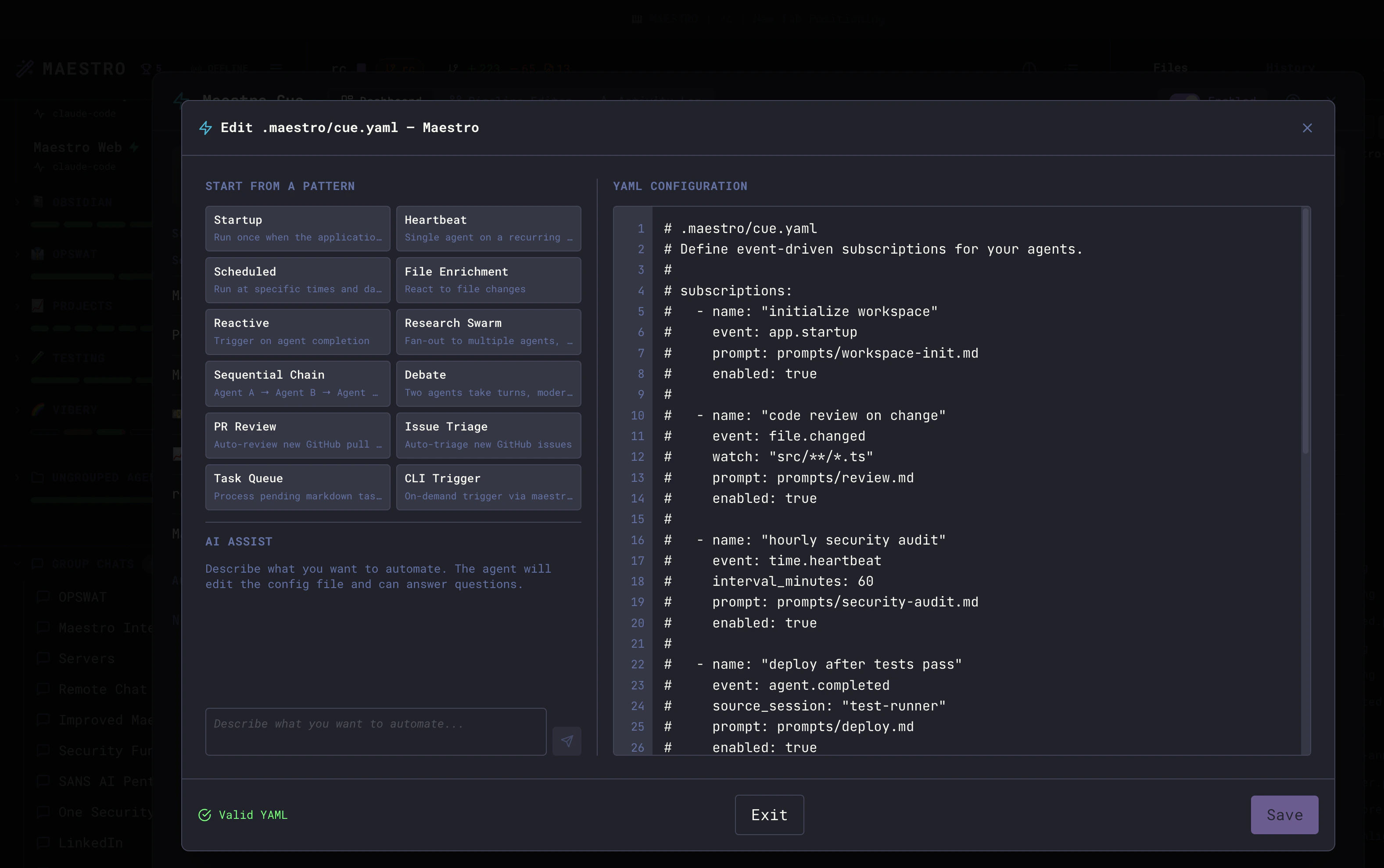
.maestro/cue.yaml file placed inside the .maestro/ directory at your project root. The engine watches this file for changes and hot-reloads automatically.
File Location
.maestro/cue.yaml in its project root gets its own independent Cue engine instance.
One cue.yaml per agent project root. The engine reads ONLY
<projectRoot>/.maestro/cue.yaml for each agent - it does not walk parent directories and does not fall back to any ancestor or workspace-wide config. If your fleet has agents at multiple project roots, you maintain one cue.yaml per root. See Multi-root pipelines below.Full Schema
Sharing a workspace across agents
When two or more agents are registered against the same project directory (for example, one agent using Opus and another using Sonnet, both pointing at the same vault), every unowned subscription (one without an explicitagent_id) would otherwise fire once per agent. Maestro resolves this as follows:
settings.owner_agent_idset and matched by some agent in the root - that agent is the owner; other agents in the same root skip unowned subscriptions.settings.owner_agent_idset but matched by nobody - the config is dead. Every agent in that project root skips unowned subscriptions, and each row in the Cue dashboard is flagged with a red warning linking to this setting.settings.owner_agent_idunset and multiple agents share the root - the first agent in the session list wins. Non-winner rows in the Cue dashboard are flagged with a red warning naming the winner and pointing toowner_agent_idas the override.
owner_agent_id: the agent’s internal id (UUID) or its display name (e.g. Obsidian).
Subscriptions with an explicit agent_id continue to fan out independently of ownership - useful when a single shared config intentionally targets multiple agents in the same workspace.
Multi-root pipelines (agents in different project roots)
When a pipeline spans agents that live in different project roots, it is physically multiple cue.yaml files - one per participating agent’s project root. The engine never aggregates yaml across roots, so a “single root cue.yaml” is not a reliable pattern for a multi-root agent fleet. The rule: Each subscription lives in the.maestro/cue.yaml of the agent that owns it. “Owning agent” = the agent whose agent_id matches the subscription’s agent_id field. Cross-agent chains between subscriptions in different files are stitched at runtime via the standard source_session / fan_out fields plus their UUID-keyed companions (source_session_ids / fan_out_ids) - no shared file required.
Where each role lives:
Orchestration “at the root.” If you have an orchestrator agent whose project root sits above the worker agents in the filesystem, the orchestrator’s own
.maestro/cue.yaml is naturally where fan-in / synthesis subscriptions land - because it owns those subscriptions, not because it is “the root.” Workers’ triggers still live in each worker’s own cue.yaml.
Always set source_session / fan_out; add the _ids companions for rename stability. The validator requires source_session on every agent.completed subscription, and fan_out is the canonical field for fan-out targets. Additionally populate the parallel UUID arrays - source_session_ids: [<agent-uuid>] next to source_session: <agent-name>, fan_out_ids: [<uuid>, ...] next to fan_out: [<name>, ...]. The dispatcher prefers ids at lookup time and falls back to names, so cross-root edges survive an upstream agent rename. Omitting the ids works but silently breaks on rename.
Pipeline grouping across files. A pipeline that spans roots still appears as one card in the Cue dashboard / Pipeline Graph as long as every participating subscription carries the same pipeline_name (and same # Pipeline: Name (color: #hex) comment header in each file). The visual editor handles this automatically; if you hand-author, keep the values consistent across every file.
The visual editor is the easy path. When you save a multi-root pipeline from the Pipeline Graph, Maestro automatically partitions the subscriptions by owning agent’s project root and writes one yaml per participating cwd. If you find yourself authoring a multi-root pipeline by hand and it gets fiddly, building it in the Pipeline Graph and letting it emit the per-cwd files is the supported path.
Subscriptions
Each subscription is a trigger-prompt pairing. When the trigger fires, Cue sends the prompt to the agent.Required Fields
Either
prompt or prompt_file must be provided. If both are present, prompt_file takes precedence.Optional Fields
Prompt Field
Prompts can be provided inline or via a separate file. Inline prompt:prompt_file):
{{VARIABLE}} template syntax as inline prompts. Using prompt_file keeps your cue.yaml clean when prompts are long or complex - the Pipeline Graph uses this approach by default, storing prompt files in .maestro/prompts/.
Output Prompt (Two-Phase Runs)
Theoutput_prompt field enables a two-phase execution pattern. When the main prompt completes successfully, Cue automatically sends the output_prompt as a follow-up - with the first run’s output included as context.
This is useful for workflows where one phase generates data and a second phase acts on it:
output_prompt_file to reference a .md file instead of inline text:
The output prompt only fires when the main run completes successfully. If the main run times out or fails, the output phase is skipped.
Model and Effort
By default a subscription runs on the agent’s own configured model and effort. Settier (or an exact model) and effort to give one pipeline step a different model without changing the agent:
tier and effort use one vocabulary for every provider. Maestro maps each level to that provider’s own models and effort ladder, using the same tables as Auto Run’s MAESTRO:MODEL markers:
Rules:
- Set
tierormodel, never both. Usemodelfor a provider with no tier table, or for a model a tier cannot name. - If the provider cannot honor a
tieroreffort, the run still happens on the agent’s own value, and the Cue log records a warning. - A fan-out subscription applies one setting to every target. In the Pipeline Graph, agents with different settings get their own subscription each.
- An
output_promptfollow-up runs on the same model as its main run. tier,model, andeffortapply only to agent runs. The validator rejects them onaction: commandandaction: notify.
--tier, --model, and --effort to maestro-cli cue schedule.
Pipelines
A pipeline groups multiple subscriptions under a single name in the Pipeline Graph. This is useful when you have related automations (e.g., a daily scan and a weekly review) that logically belong together. Defining a pipeline: Add a pipeline comment at the top of yourcue.yaml, then use a naming convention to group subscriptions:
- The
# Pipeline: Name (color: hex)comment declares the pipeline name and its color in the UI - The first subscription’s
namematches the pipeline name exactly - Additional subscriptions in the same pipeline use the convention
Name-chain-N(e.g.,My Pipeline-chain-1,My Pipeline-chain-2) - All subscriptions with matching names appear as separate trigger lines within a single pipeline in the Pipeline Graph
- The
colorin the comment sets the pipeline’s dot color in the UI (any valid hex color) - Each subscription in a pipeline can have its own event type, schedule, and prompt - they don’t need to share configuration
- Use the
labelfield to give each line a descriptive name (e.g., “Daily Analysis”, “Weekly Review”) - The Pipeline Graph creates this structure automatically when you use the visual editor
target_node_key, fan_out_node_keys): When you save from the Pipeline Graph, you may see UUID-valued target_node_key / fan_out_node_keys fields on subscriptions. These are renderer-only - the Cue engine ignores them. They let the editor distinguish “two visual nodes that happen to point at the same agent” (different keys → two nodes on the canvas) from “one shared node with multiple inputs” (same key → explicit fan-in onto a single node). If you hand-edit YAML and want two separate visual instances of the same agent for the same trigger, give each sub a different target_node_key; if you want them to merge into one fan-in target, give them the same key. Leave the keys alone when round-tripping through the editor - clearing them silently re-merges your visual nodes by agent_id on the next reload.
Agent-authored Trigger -> Command -> Agent YAML checklist
If an AI agent writescue.yaml directly (without using the visual editor), include all of the following so Maestro reconstructs the graph correctly:
- Initial trigger subscription uses
action: commandwith a validcommandobject. - The downstream
agent.completedsubscription includessource_subpointing to that command subscription name. - For fan-in chains, when
source_sub/source_session/source_session_idsare arrays, all three must be the same length and positionally aligned: indexiin each array refers to the same upstream source. The validator rejects mismatched lengths. - Keep
pipeline_nameconsistent across all subs in the pipeline. - Keep per-node identity fields (
target_node_key,fan_out_node_keys) stable once created.
Labels
Thelabel field provides a human-readable name displayed in the Cue dashboard and pipeline editor. When subscriptions are grouped into a pipeline, the label distinguishes each line within the pipeline.
Disabling Subscriptions
Setenabled: false to pause a subscription without deleting it:
Settings
The optionalsettings block configures global engine behavior. All fields have sensible defaults - you only need to include settings you want to override.
timeout_minutes
Default:30 | Type: positive number
Maximum duration (in minutes) for a single Cue-triggered run. If an agent takes longer than this, the run is terminated.
timeout_on_fail
Default:'break' | Type: 'break' or 'continue'
What happens when a run times out:
break- Stop the run and mark it as failed. No further processing for this event.continue- Stop the run but allow downstream subscriptions (in fan-in chains) to proceed with partial data.
max_concurrent
Default:1 | Type: integer, 1-10
Maximum number of Cue-triggered runs that can execute simultaneously for this agent. Additional events are queued.
queue_size
Default:512 | Type: integer, 0-10000
Maximum number of events that can be queued when all concurrent slots are occupied. Events beyond this limit are dropped.
Default is 512 - generous enough to absorb bursty triggers without surfacing overflow toasts. Lower it to backpressure faster; set to 0 to drop any event that can’t run immediately.
Validation
The engine validates your YAML on every load. Common validation errors:
The inline YAML editor in the Cue Modal shows validation errors in real-time as you type. A green Valid YAML indicator at the bottom confirms your config parses correctly.