
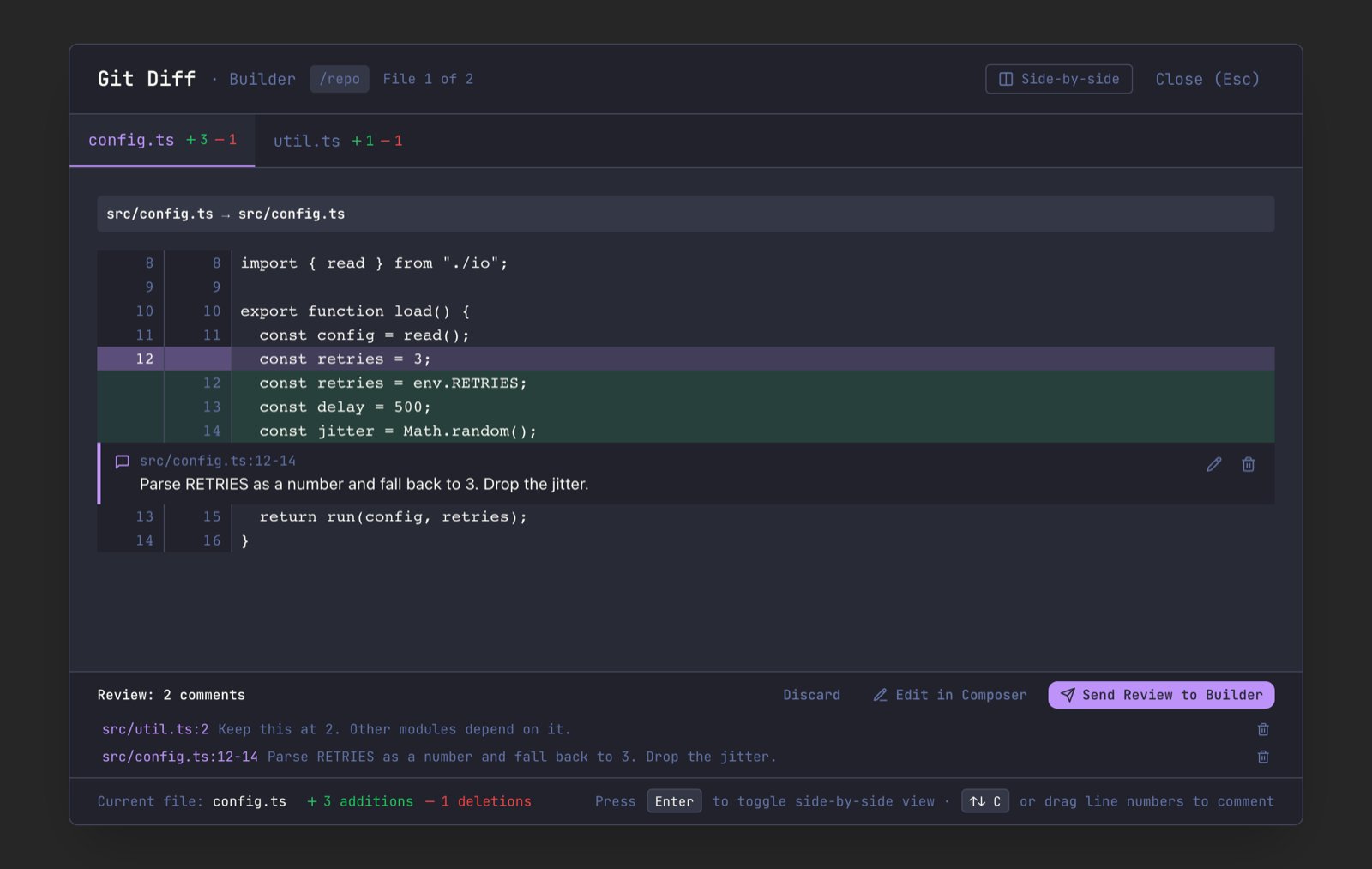
src/app.ts:12-14) and quotes the diff hunk it was left on. The agent can find the code without guessing, even after the file has moved on.
Open the diff
- Press
Cmd+Shift+D/Ctrl+Shift+Dfor the agent you are looking at. - Right-click an agent in the Left Bar and pick View Git Diff for that agent.
- Hover the git status widget beside the branch pill and open the full diff from there.
Leave a comment
With the mouse:- Click a line number. A comment box opens under that line.
- For a range, press on the first line number and drag to the last, or click one line number and
Shift+click another. - Type your comment (Markdown is fine) and press
Cmd+Enter/Ctrl+Enter, or click Add Comment.
- Press
DownorUpto move a line cursor through the file. The first press lands on the first changed line. - Hold
ShiftwithDownorUpto extend the cursor into a range. - Press
Cto open a comment box on the selected lines. - Press
Cmd+Enter/Ctrl+Enterto save it.
Line numbers
Line numbers refer to the current version of the file. A comment on removed lines only can’t use those numbers, because the lines no longer exist, so it numbers them as in the previous version and says so:src/app.ts:7 (previous version). For a renamed file, those previous-version numbers are given with the file’s previous name.
Collect the review
Saved comments appear under the last line they cover. Every pending comment, across every file in the diff, is listed in the Review tray at the bottom of the viewer. Click a comment in the tray to jump to its file and edit it, or click the trash icon to remove it. Comments stay until you send or discard them:- Switching between file tabs in the viewer keeps them, including a comment you are still typing.
- Closing the viewer keeps them, and a comment you were still typing. Open the diff for the same repository again and they are back, with the unfinished comment open on its lines. If those lines changed in the meantime, its text is kept in the tray as an outdated comment.
- Quitting Maestro clears them.
Outdated comments
The agent may change the code while your review is pending. When you reopen the diff, Maestro checks each comment against it. If the lines a comment covers moved, changed, or left the diff, the comment is marked Outdated in the tray and is no longer drawn on a line. An outdated comment is never sent, because itspath:lines would point the agent at the wrong code. It stays in the tray so you can read it, remove it, or write it again on the new lines. The tray header counts them, and when every comment is outdated the send actions are turned off.
Send the review
The tray has three actions:
If the review can’t be delivered (the agent was removed, or has no AI tab), Maestro says so and keeps your comments. After a send, only outdated comments stay behind.
What the agent receives
The review arrives as one message. For two comments it looks like this:... where lines were left out.
If the diff was taken somewhere other than the agent’s working directory (for example, the agent’s terminal is in another repository), the review says which directory the changes are in, so the agent does not edit matching files in the wrong repository.
Shortcuts
These work while the Git Diff viewer is open over an agent that can take a review.
The viewer’s other keys still apply:
Enter switches between unified and side-by-side view, and Cmd+[ / Cmd+] (Ctrl+[ / Ctrl+]) move between files.
For agents and scripts
Every action in the tray has amaestro-cli verb, working on the same pending comments the viewer shows: add, edit, remove, discard (clear), send, and edit in composer (send --compose). A comment added or edited from the CLI appears in an open viewer’s tray, and send runs the same code as Send Review. As in the tray, an outdated comment cannot be edited; remove it and add a new one.
send delivers without moving your view unless you pass --focus. See CLI: Reviewing an Agent’s Diff.